
Thursday, April 9, 2015
4 pic 1 word

Thursday, March 19, 2015
3-D Photography
Practice:


This is 3-D photography. These are two of the practices I did. How you achieve this effect is taking a picture then slightly move the camera to the left of right. In Photoshop one would stick the second picture on top of the first. Set it slightly off and double click on the top layer. Un-check the red color. Put the glasses on and make necessary adjustments. To finish do basic correction and flatten the image.


These two have the same effects but they where taken outside of class.
This is 3-D photography. These are two of the practices I did. How you achieve this effect is taking a picture then slightly move the camera to the left of right. In Photoshop one would stick the second picture on top of the first. Set it slightly off and double click on the top layer. Un-check the red color. Put the glasses on and make necessary adjustments. To finish do basic correction and flatten the image.
Outside Photos:
These two have the same effects but they where taken outside of class.
Monday, March 9, 2015
Painting with Light


These both are multiple pictures in one. The first one is a tribute to Breast Cancer. The last one was just a fun project to waist time.

This is one with the pencil effect on Photoshop.
Monday, March 2, 2015
Motion Blur

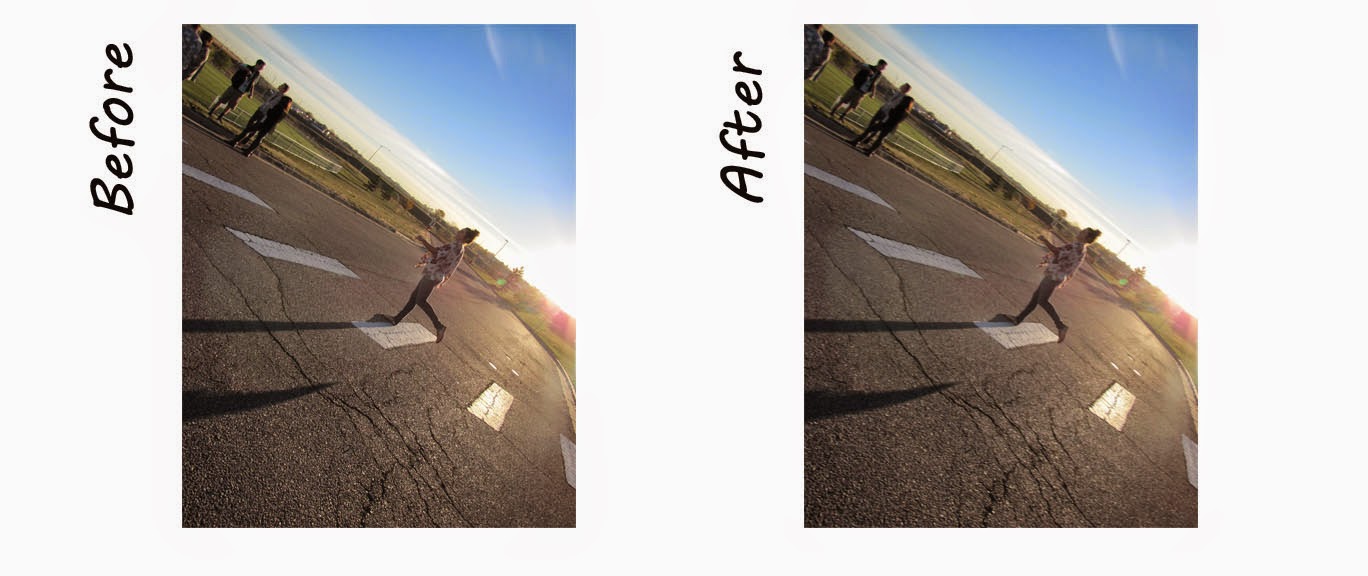

This is motion blur. This is a Photoshop technique in which you blur a still picture in the direction of the motion.
Monday, February 23, 2015
Gaussian Blur
Depth of Field:


0-50-100:


When using this technique it creates a better and more realistic look. The first plan is 100 opacity and flow, the next is 50 opacity and flow, and the last one 0 opacity and flow. This creates a nice even flow.
Thursday, February 12, 2015
Comic Book Cover
Color Halftone:
 Regular:
 The purpose to this project is to create a Comic Book Cover. To create this, I had to get internet images for the "bang", "Pow", and "Wham". In addition, I added the bomb in the background from the internet. I also added the price tag and bar code. Using the text tool I added the issue tittle, speech bubble, volume number, and the tittle. To get the comic book effect I added the color halftone in Photoshop. The second one is with out the color halftone effect.
Monday, February 2, 2015
Indoor Macro: Color Selection


Subscribe to:
Posts (Atom)